
ENGAGE™
Put Your HomeAdvantage Marketing On Autopilot
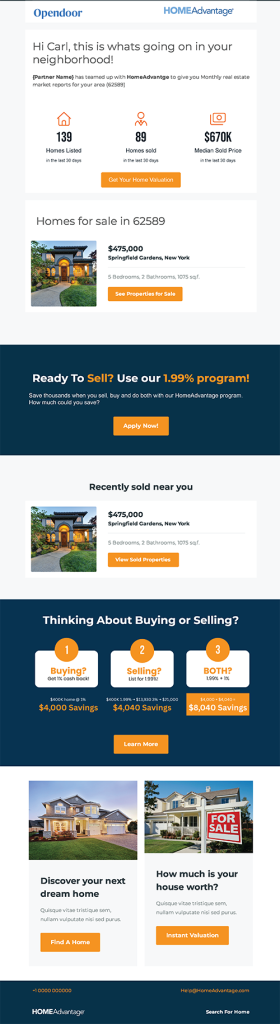
HomeAdvantage Engage™ helps put your marketing efforts on autopilot by delivering a monthly real estate report to your borrowers inboxes. This co-branded email includes everything buyers and sellers need at the start of their journey such as market trends, estimates of value, new property listings and recent sales – all personalized and localized to their physical address. The Engage program generates awareness for HomeAdvantage while promoting you as a one-stop shop for real estate.
• Personalized Market Reports: Deliver dynamic, co-branded real estate reports to your members that are personalized with local market data and MLS listing activity.
• Outsourced Effort: Leverage our real estate technology and content to build awareness and generate borrowers without heavy lifting from your marketing department.
• Compliant Delivery: Engage emails are fully compliant with all CAN-SPAM requirements, including sender identification, branding and subscription management.
ENGAGE™ IMPLEMENTATION STEPS
Step 1: Create a .CSV file
Create a .CSV file that contains the nine required data fields. Please ensure that your field headers match the Header Field Name exactly and that you name your .CSV file in the following format: CreditUnionName_FileDate_Engage.
Step 2: Submit a test file for review
To ensure an accurate match within our automation system, we prefer to review a test file in advance. Please send a partial .CSV file that contains the Header Field Names along with at least one member record to TechSupport@HomeAdvantage.com. Please also include the IP address from which your credit union will be sending the final .CSV file so that we can authorize the address on our SFTP server.
Step 3: Complete your SFTP
Once your test file has been reviewed and approved by the HomeAdvantage team, you will receive final SFTP login instructions.
Step 4: Ongoing file maintenance
To coordinate Unsubscribe or Opt-outs, you can send a file with members to exclude from Engage emails and use the following file name format: CreditUnionName_FileDate_Engage_OptOuts.csv.
ENGAGE FILE FIELDS
If you have any questions about this process, please contact your Regional Account Manager or email TechSupport@HomeAdvantage.com.
|
Header Field Name |
Field Description |
| First Name | Member First Name |
| Last Name | Member Last Name |
| Email Address | Member Email |
| Phone | Member Phone Number |
| Phone Type | Phone Type* |
| Address 1 | Street Address 1 |
| Address 2 | Street Address 2 |
| City | City |
| State | State |
| Zip | Zip |
Just a few quick reminders about deliverability:
- To make sure we’re delivering the best experience, please provide a list that includes members you’ve emailed in the last 60 days.
- We’ll do a quick test on a small sample of the list to make sure it’s in great shape. If the bounce rate seems a bit high (over 3%), we’ll kindly ask you to clean the list so we can keep everything running smoothly.
- If you’d like, we can also help with list cleaning for a small fee based on the list size. We’re here to help make the process easy!
- We may not have market trend data to be able to email everyone on your list (due to real estate sales activity and/or state regulations).
- If the recipient of an email does not open an email for three consecutive months, We will pause their monthly emails and email them quarterly.